Master Social Media Lower Thirds in After Effects
More Than Just Text: Why Your Video Content Needs Professional Lower Thirds
We’ve all seen it: a fantastic video with great content, but the on-screen text looks like it was added as an afterthought. It’s a missed opportunity. Lower thirds, the graphics that appear in the lower part of the screen to identify a speaker, location, or topic, are a critical part of professional video production. They aren’t just labels; they are an extension of your brand identity. A well-designed lower third adds polish, reinforces your message, and builds viewer trust. For content creators, marketers, and business owners, getting this right can be the difference between amateur and authoritative.
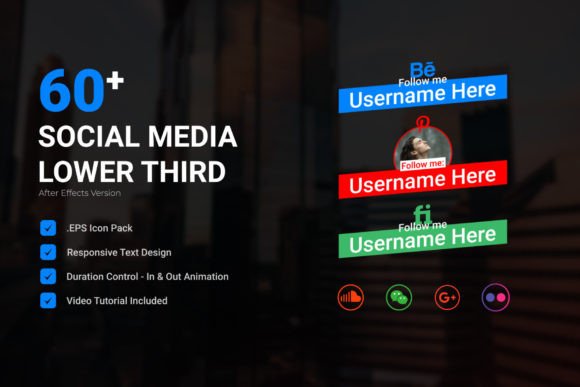
This is where a comprehensive toolkit like the Social Media Lower Third | After Effects project becomes invaluable. It’s not just a collection of text boxes. It’s a system designed to solve a real problem: creating consistent, engaging, and branded social media graphics efficiently. The personality of this project is clean, modern, and highly functional. It avoids overly flashy trends in favor of timeless design principles, ensuring your content won’t look dated in six months. The visual style is versatile, offering a range from minimal and corporate to dynamic and creative, making it a workhorse for a wide array of projects.
Practical Applications for Every Creator
The true value of a design asset lies in its flexibility. This Social Media Lower Third kit is built for real-world use across countless scenarios. Imagine you're a podcast host. You can use these lower thirds to introduce your guests with their name, title, and social media handle, all animated smoothly onto the screen. For a small business owner creating product tutorials or Instagram Reels, these graphics provide a professional way to highlight key features, prices, or a call-to-action like "Shop Now" or "Link in Bio."
Entrepreneurs and marketers will find it indispensable for webinar recordings, online course modules, and testimonial videos. The ability to control duration and animation style means you can match the graphic's pace to your video's rhythm. Bloggers and publishers can use them in YouTube videos or Facebook Live sessions to create a cohesive look that aligns with their website's brand identity. The included .EPS Social Media Icon File is a practical touch, allowing you to seamlessly integrate platform-specific icons that are crisp at any size. This isn't just about making things look pretty; it's about effective communication and brand consistency.
Key Features That Save Time and Ensure Quality
Working efficiently is key for any creator. This After Effects project understands that. The Well Organized structure and No Plugins Required design mean you can dive in without technical headaches. You don’t need to be an After Effects guru to use it effectively. The Video Tutorial Included walks you through customization, which is a huge benefit for those still learning the software.
Let’s break down the most impactful features:
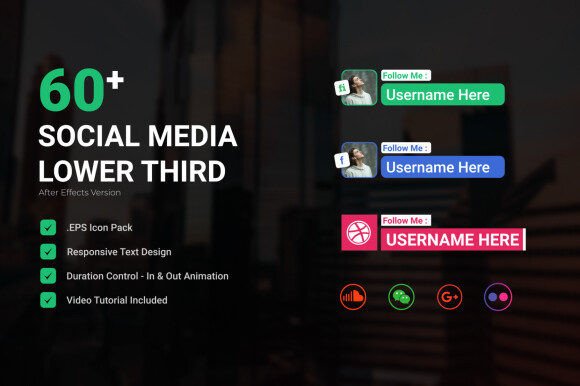
- Color Control Easily: This is a game-changer for brand consistency. With a few clicks, you can match every element to your exact brand palette, ensuring your videos are instantly recognizable.
- Responsive Text: This feature automatically adjusts the background bar or shape to fit the length of your text. No more manually resizing boxes every time you change a name or title. It saves a tremendous amount of time and prevents layout errors.
- Work with Any Fonts & Font Link Included: You are not locked into a single typeface. The project is built to work with the fonts you already use in your brand guidelines. The included font link is a helpful starting point, giving you a solid, complementary typeface right out of the box.
- Duration Control & IN/OUT Animation: Fine-tune how long the graphic stays on screen and choose from a variety of professional animations. This level of control helps you craft a more engaging viewer experience, avoiding jarring cuts or awkward pauses.
Choosing and Integrating Your Lower Thirds
When evaluating a project like this, think about your specific workflow. Start by reviewing the 60+ Social Media Lower Third options. Do they offer a range that covers your needs? You’ll want some for simple name plates, others for social handles, and perhaps some for quotes or highlights. The Modern Typography and clean lines make them suitable for both Sans Serif Font and Serif Font pairings, depending on the style you select.
A practical step is to test a few designs with your own content. Import the project, change the text and colors, and see how it looks over a 10-second clip of your actual video. Does the animation feel right for your brand's personality? Is the text readable against various video backgrounds? This hands-on testing is more valuable than just looking at the preview. Consider how the lower thirds will function as part of your broader Design Assets toolkit. They should complement your logo, intro/outro sequences, and other on-screen graphics to build a cohesive Brand Identity.
Ultimately, investing in a quality lower third template is about investing in your content's professionalism. It streamlines your production process, elevates the visual quality of your videos, and strengthens your brand's presence across every platform. It’s a practical solution that delivers tangible results, helping you communicate more effectively and connect with your audience on a deeper level.